
Installation:
1. Install according to order (recommended).
2. This model design for windows vista and windows 7, so the drivers is listed base on compatible drivers available on the Hp website, vendor website and my personal experience installing window xp on this model.
3. If you need tutorial installing windows xp for CQ60 you can read it here.
4. Install .Netframework 2.0 Before Hp Quicklaunch Installation.
Drivers
Chipset
Nvidia Nforce Chipset Driver
Version 15.26 WHQL 162MB
Download
Graphic
Nvidia Geforce8200M G Graphics Card:
Version 178.24WHQL 84MB
Download
If direct install failed follow guide here
Audio Drivers:
Conextant High definition Audio Driver
Have disk method is required, read the instruction here: Download Page
Bluetooth:
HP Integrated Module with Bluetooth Wireless Technology
Version 5.1E 94.68M
Download
Card Reader
Realtek USB 2.0 Card Reader
Version 6.1.7600.48 7.96MB
Download
Wireless Driver:
There are 3 wireless drivers. Choose base on your specs.
Atheros 2011 Wireless LAN Driver
Version 1.10 79.23MB (all OS)
Download
Broadcom Wireless Drivers
Version5.10.91.8 10MB
Download
Intel PRO/Wireless Drivers:
(requires windows installer 3.0 installed first)
Version 5.20 4MB
Download
Button:
HP Quick-launch Button
Version 6.40B 19MB
Download
Touchpad:
Synaptics Touchpad Driver
Version:9.1.11 Q, 16.93M
Download
Webcam
Cyberlink youcam software 2.0 + Driver
Download
Tools and Utilities
Lightscribe System Software:
Version 1.18.1.1 A 8.4M
Download
HP Wireless Assistant
Version:3.50.11.2, 3.81M
Download
Motorola SoftStylus
Version:2.2.119.2, 42.73M
Download
Resources:
1. Audio Drivers : If you want to get the audio drivers provided by Microsoft, go to Microsoft update catalog using Internet Explorer browser. Search for " Conextant High Definition Smart Audio 221". On the search result look for version 3.49.4.51 date: 6/11/2008size: 783kb. Install manually via device manager using the same method to install the conextant audio explained on this link.
2. Previous version of Nvidia chipset driver 15.24 available here.
Jumat, 08 Januari 2010

Compaq Presario CQ60-440EN Windows XP Driver
Installation:
1. Install according to order (recommended).
2. This model design for windows vista and windows 7, so the drivers is listed base on compatible drivers available on the Hp website, vendor website and my personal experience installing window xp on this model.
3. If you need tutorial installing windows xp for CQ60 you can read it here.
4. Install .Netframework 2.0 Before Hp Quicklaunch Installation.
Drivers
Chipset
Nvidia Nforce Chipset Driver
Version 15.26 WHQL 162MB
Download
Graphic
Nvidia Geforce8200M G Graphics Card:
Version 178.24WHQL 84MB
Download
If direct install failed follow guide here
Audio Drivers:
Conextant High definition Audio Driver
Have disk method is required, read the instruction here: Download Page
Bluetooth:
HP Integrated Module with Bluetooth Wireless Technology
Version 5.1E 94.68M
Download
Card Reader
Realtek USB 2.0 Card Reader
Version 6.1.7600.48 7.96MB
Download
Wireless Driver:
There are 3 wireless drivers. Choose base on your specs.
Atheros 2011 Wireless LAN Driver
Version 1.10 79.23MB (all OS)
Download
Broadcom Wireless Drivers
Version5.10.91.8 10MB
Download
Intel PRO/Wireless Drivers:
(requires windows installer 3.0 installed first)
Version 5.20 4MB
Download
Button:
HP Quick-launch Button
Version 6.40B 19MB
Download
Touchpad:
Synaptics Touchpad Driver
Version:9.1.11 Q, 16.93M
Download
Webcam
Cyberlink youcam software 2.0 + Driver
Download
Tools and Utilities
Lightscribe System Software:
Version 1.18.1.1 A 8.4M
Download
HP Wireless Assistant
Version:3.50.11.2, 3.81M
Download
Motorola SoftStylus
Version:2.2.119.2, 42.73M
Download
Resources:
1. Audio Drivers : If you want to get the audio drivers provided by Microsoft, go to Microsoft update catalog using Internet Explorer browser. Search for " Conextant High Definition Smart Audio 221". On the search result look for version 3.49.4.51 date: 6/11/2008size: 783kb. Install manually via device manager using the same method to install the conextant audio explained on this link.
2. Previous version of Nvidia chipset driver 15.24 available here.
1. Install according to order (recommended).
2. This model design for windows vista and windows 7, so the drivers is listed base on compatible drivers available on the Hp website, vendor website and my personal experience installing window xp on this model.
3. If you need tutorial installing windows xp for CQ60 you can read it here.
4. Install .Netframework 2.0 Before Hp Quicklaunch Installation.
Drivers
Chipset
Nvidia Nforce Chipset Driver
Version 15.26 WHQL 162MB
Download
Graphic
Nvidia Geforce8200M G Graphics Card:
Version 178.24WHQL 84MB
Download
If direct install failed follow guide here
Audio Drivers:
Conextant High definition Audio Driver
Have disk method is required, read the instruction here: Download Page
Bluetooth:
HP Integrated Module with Bluetooth Wireless Technology
Version 5.1E 94.68M
Download
Card Reader
Realtek USB 2.0 Card Reader
Version 6.1.7600.48 7.96MB
Download
Wireless Driver:
There are 3 wireless drivers. Choose base on your specs.
Atheros 2011 Wireless LAN Driver
Version 1.10 79.23MB (all OS)
Download
Broadcom Wireless Drivers
Version5.10.91.8 10MB
Download
Intel PRO/Wireless Drivers:
(requires windows installer 3.0 installed first)
Version 5.20 4MB
Download
Button:
HP Quick-launch Button
Version 6.40B 19MB
Download
Touchpad:
Synaptics Touchpad Driver
Version:9.1.11 Q, 16.93M
Download
Webcam
Cyberlink youcam software 2.0 + Driver
Download
Tools and Utilities
Lightscribe System Software:
Version 1.18.1.1 A 8.4M
Download
HP Wireless Assistant
Version:3.50.11.2, 3.81M
Download
Motorola SoftStylus
Version:2.2.119.2, 42.73M
Download
Resources:
1. Audio Drivers : If you want to get the audio drivers provided by Microsoft, go to Microsoft update catalog using Internet Explorer browser. Search for " Conextant High Definition Smart Audio 221". On the search result look for version 3.49.4.51 date: 6/11/2008size: 783kb. Install manually via device manager using the same method to install the conextant audio explained on this link.
2. Previous version of Nvidia chipset driver 15.24 available here.
Rabu, 06 Januari 2010
How to enable microphone after install windows XP
Some laptop model or PC will not detect the microphone after install windows XP because by default the MIC volume is mute. If you can listen to music using your PC and Laptop that mean basically your mic will work.
FIRST STEP:
Enable your microphone volume
1. Right click on your volume icon and select Open Volume Control.

2. Then click on OPTION.

3. Select PROPERTIES.

4. On the list, make sure the MICROPHONE box is Check, if not, click to check it.

5. Then press OK. After that you will back to the VOLUME CONTROL again. Here you will see the microphone panel appear.

So if the MUTE BOX under Microphone Panel check, uncheck it, and it will look like this:

FIRST STEP:
Enable your microphone volume
1. Right click on your volume icon and select Open Volume Control.

2. Then click on OPTION.

3. Select PROPERTIES.

4. On the list, make sure the MICROPHONE box is Check, if not, click to check it.

5. Then press OK. After that you will back to the VOLUME CONTROL again. Here you will see the microphone panel appear.

So if the MUTE BOX under Microphone Panel check, uncheck it, and it will look like this:

6. Increase The mic volume as you like and you're done.
Compaq Presario CQ35-243TX Windows XP Driver
Chipset
Intel Chipset Installation Utility for 4 Series
Version 9.0.0.1011A 2.36MB
Download
Graphic:
(2 drivers, choose base on your specs)
Mobile Intel 4 Series Express Chipset Family Graphics Driver
Version 1.00 REV A
Download
Nvidia GeForce G 105M/G 103M For windows XP
Version 2.66.58WHQL 118MB
Download
Audio:
1. Install MS-UAA and restart:
Microsoft Universal Audio Architecture (UAA) Bus Driver for High Definition Audio (sp33867)
Download
2. Install the Audio:
IDT High Definition Audio Codec
(2 drivers, if the first one didn't work, use 2nd drivers)
Download (SP41693)
Download (SP39671)
If Sound disappear after restart read here.
Wireless:
(3 drivers, choose 1 base on your specification)
Broadcom 4313 a/b/g/n wireless Drivers
Version5.10.91.8 10MB
Download
Intel PRO/Wireless Drivers:
(requires windows installer 3.0 installed first)
Version 5.20 4MB
Download
Atheros Wireless LAN Driver:
Version 2.00B 20.64MB
Download
Broadband:
Qualcomm Mobile Broadband Drivers - Gobi1000
Version:3.00, 130.23M Download
Fingerprint
(2 drivers, install both according to order)
Validity Fingerprint Sensor Driver
Version:3.1.366 A, 43.37M Download
Digital Persona Fingerprint Reader Software
Version:4.1.0.3790 A, 22.34M Download
LAN/Ethernet
Realtek RTL8168D/8111D PCI-E Gigabit Ethernet Adapter
Download
Or directly from relatek site: Download
(select WinXP, Win2K, Win2003 Auto Installation Program)
Infrared:
ENE CIR Receiver Drivers
Version 2.6.6.0A 2MB
Download
Card Reader
Realtek USB 2.0 Card Reader
Version 6.1.7600.48 7.96MB
Download
Button:
HP Quick-launch Button
Version 6.40B 19MB
Hardware ID: ACPI \ PNP0C32
Download
Touchpad:
Synaptics Touchpad Driver
Version:9.1.11 Q, 16.93M
Download
Bluetooth:
HP Integrated Module with Bluetooth Wireless Technology
Download
Webcam
Cyberlink youcam software 2.0 + Driver
Download
NOTE:
There might be some issue with the light, This BIOS will solve it but for those who not familiar with BIOS, please note that flashing your laptop with BIOS may harm your system.
BIOS: Download
Intel Chipset Installation Utility for 4 Series
Version 9.0.0.1011A 2.36MB
Download
Graphic:
(2 drivers, choose base on your specs)
Mobile Intel 4 Series Express Chipset Family Graphics Driver
Version 1.00 REV A
Download
Nvidia GeForce G 105M/G 103M For windows XP
Version 2.66.58WHQL 118MB
Download
Audio:
1. Install MS-UAA and restart:
Microsoft Universal Audio Architecture (UAA) Bus Driver for High Definition Audio (sp33867)
Download
2. Install the Audio:
IDT High Definition Audio Codec
(2 drivers, if the first one didn't work, use 2nd drivers)
Download (SP41693)
Download (SP39671)
If Sound disappear after restart read here.
Wireless:
(3 drivers, choose 1 base on your specification)
Broadcom 4313 a/b/g/n wireless Drivers
Version5.10.91.8 10MB
Download
Intel PRO/Wireless Drivers:
(requires windows installer 3.0 installed first)
Version 5.20 4MB
Download
Atheros Wireless LAN Driver:
Version 2.00B 20.64MB
Download
Broadband:
Qualcomm Mobile Broadband Drivers - Gobi1000
Version:3.00, 130.23M Download
Fingerprint
(2 drivers, install both according to order)
Validity Fingerprint Sensor Driver
Version:3.1.366 A, 43.37M Download
Digital Persona Fingerprint Reader Software
Version:4.1.0.3790 A, 22.34M Download
LAN/Ethernet
Realtek RTL8168D/8111D PCI-E Gigabit Ethernet Adapter
Download
Or directly from relatek site: Download
(select WinXP, Win2K, Win2003 Auto Installation Program)
Infrared:
ENE CIR Receiver Drivers
Version 2.6.6.0A 2MB
Download
Card Reader
Realtek USB 2.0 Card Reader
Version 6.1.7600.48 7.96MB
Download
Button:
HP Quick-launch Button
Version 6.40B 19MB
Hardware ID: ACPI \ PNP0C32
Download
Touchpad:
Synaptics Touchpad Driver
Version:9.1.11 Q, 16.93M
Download
Bluetooth:
HP Integrated Module with Bluetooth Wireless Technology
Download
Webcam
Cyberlink youcam software 2.0 + Driver
Download
NOTE:
There might be some issue with the light, This BIOS will solve it but for those who not familiar with BIOS, please note that flashing your laptop with BIOS may harm your system.
BIOS: Download
Senin, 04 Januari 2010
Intel 82852/82855 GM/GME Windows 7 Driver
Intel 82852/82855 GM/GME Graphics Controller Driver For Windows 7
notes: make sure you follow the instructions carefully:
compile by: Lexxion
edited by: Black x
for expert you can skip certain part, because there are many different level of users, i compose this post in details.
IMPORTANT!
make sure you log in to you pc as administrator/use administrator account
Content:
Part 1: Download and extract driver
Part 2: Uninstall current driver
Part 3: EDIT c:\windows\system32\drivers\vgapnp.sys
Part 4: EDIT c:\windows\system32\drivers\vgapnp.sys part 2
Part 5: Final Step
FIX screen Rotation
PART 1: DOWNLOAD AND EXTRACTING DRIVERS
1. Download the drivers:
Intel(R) Graphics Controller 6.14.10.3722 (Windows)
Download (direct link)
Download (cnet)
(link fixed, but i'm not hosting this file, so if it got deleted you just google for the file name, i saw many site provide the download links)
2. here files is in zip format, you need to extract it, i suggest for beginner to make your work easier, make a folder in desktop named intel graphic (right click on desktop and select new folder, type Intel Graphic)

3. Paste the driver you download on the Intel Graphic folder you just created, right click on the Intel_6_14_10_3722.zip you extracted and select extract here, it should look like this: (NOTE;: please remember where you extract the driver, you will need it later)
 proceed to part 2.
PART 2: UNINSTALL CURRENT DRIVERS
1. If you already installed other driver and failed (if you don't skip part 2), you will find yellow mark on the device manager, right click on it and select uninstall. Your Device Manager should say that you have Standard VGA Driver installed under Display category and exclamation mark on "video controller". Make sure you restart PC when asked.
PART 3: EDIT c:\windows\system32\drivers\vgapnp.sys
1.Click 'Start' and in 'Search' type 'cmd'. The result will show on top. Right-click on 'cmd' and choose "Run as Administrator". If your account does not have admin rights you might be prompted to enter username and password. I used account that already has administrator privileges.


3. Press enter and the result will be success etc, refer to picture above. (the username are differ so your line might differ from the screenshoot)
4. Then type or copy and paste this line:
cacls c:\windows\system32\drivers\vgapnp.sys /G peter:F
IMPOTANT: at line above you must replace!! peter with your computer name, how to check your computer name, click start and note under the pictures it show your pc name, look at the picture below:

above note my pc name is ajis
cacls c:\windows\system32\drivers\vgapnp.sys /G ajis:F
, after that type it on your cmd (look at pics below after press enter
There will be a confirmation message so type 'y'

PART 4: EDIT c:\windows\system32\drivers\vgapnp.sys
1. Open c:\windows\system32\drivers\vgapnp.sys right click and select open or open with.
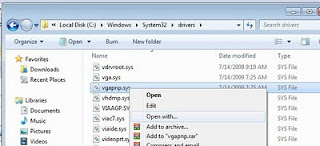
2. choose second option on the radio button "select program from a list of installed programs "

3. then select notepad

4. Just add any character to the begining of the text. Let's say we will add character x . So the text should start with xMZ and the rest of stuff. Save the file. This edit will render that file unusable.
example before we add text it should look like this:

after adding text it should look like this

PART5: FINAL STEP
1.First open device manager by click start and type devmgmt.msc as shown in the pictures below.
 2. In Device Manager uninstall Standard VGA Adapter.

3. It will prompt you to restart so do it.
4.After install you will see a message saying that certain devices did NOT installed successfuly, which is GOOD :).
5.Go to Device Manager and you should see the exclamation point next to "video controller" and "video controller (vga compatible)". Right-click on "video controller (vga compatible)" and SELECT update driver.
6.Choose "Browse my computer for the Driver Software" .

7. Then select browse:

8. Then notice that in part 1 i suggest you extract the driver in new folder (folder name: intel graphic). After click browse point to the folder. expand by click the small arrow button until you find the win2000.

9. Wait for the driver to be installed. It might hang for a little (It will say that window is "not responding"). Do not worry as this is still installing the driver. It will prompt you to restart so do it. (If it does not prompt click anywhere and wait for message). After restart it will finish installing the driver.
10. Open c:\windows\system32\drivers\vgapnp.sys in any text editor. Remove the first character you put there which was x. Save the file. it should look like this before saving it (MZ - ignore other character)
Your file will be usuable again :). You can stop here if you want, but if you want to restore the permissions for the file to original state:
Right-click on any other file in the c:\windows\system32\drivers. Choose "Properties". Go to "Security" tab. Now compare that security tab with the security tab of c:\windows\system32\drivers\vgapnp.sys. Just make sure the security tabs of those two files look the same (all tabs and advanced options). In order to add "TrustedInstaller" it is not the same as regular usernames because it is a service.
You will need to type "NT SERVICE\TrustedInstaller" (without quotes) when adding it to own the file and to have all permissions. Once you done editing you can delete your account from c:\windows\system32\drivers\vgapnp.sys, because it was not there from the beginning. We took control over and the previous commands added it by default.
SCREEN ROTATION FIX:
Credit: Mike
1. Open registry editor by click start and tyoe REGEDIT.EXE and press enter.
2. Look for HKEY_LOCAL_MACHINE - - SOFTWARE - - Intel - - CUI
DISPLAY1 - EnableRotation - set value to 1
notes: make sure you follow the instructions carefully:
compile by: Lexxion
edited by: Black x
for expert you can skip certain part, because there are many different level of users, i compose this post in details.
IMPORTANT!
make sure you log in to you pc as administrator/use administrator account
Content:
Part 1: Download and extract driver
Part 2: Uninstall current driver
Part 3: EDIT c:\windows\system32\drivers\vgapnp.sys
Part 4: EDIT c:\windows\system32\drivers\vgapnp.sys part 2
Part 5: Final Step
FIX screen Rotation
PART 1: DOWNLOAD AND EXTRACTING DRIVERS
1. Download the drivers:
Intel(R) Graphics Controller 6.14.10.3722 (Windows)
Download (direct link)
Download (cnet)
(link fixed, but i'm not hosting this file, so if it got deleted you just google for the file name, i saw many site provide the download links)
2. here files is in zip format, you need to extract it, i suggest for beginner to make your work easier, make a folder in desktop named intel graphic (right click on desktop and select new folder, type Intel Graphic)

3. Paste the driver you download on the Intel Graphic folder you just created, right click on the Intel_6_14_10_3722.zip you extracted and select extract here, it should look like this: (NOTE;: please remember where you extract the driver, you will need it later)

PART 2: UNINSTALL CURRENT DRIVERS
1. If you already installed other driver and failed (if you don't skip part 2), you will find yellow mark on the device manager, right click on it and select uninstall. Your Device Manager should say that you have Standard VGA Driver installed under Display category and exclamation mark on "video controller". Make sure you restart PC when asked.
PART 3: EDIT c:\windows\system32\drivers\vgapnp.sys
1.Click 'Start' and in 'Search' type 'cmd'. The result will show on top. Right-click on 'cmd' and choose "Run as Administrator". If your account does not have admin rights you might be prompted to enter username and password. I used account that already has administrator privileges.

2. The type or copy/paste the following line (pics below):
takeown /f c:\windows\system32\drivers\vgapnp.sys

3. Press enter and the result will be success etc, refer to picture above. (the username are differ so your line might differ from the screenshoot)
4. Then type or copy and paste this line:
cacls c:\windows\system32\drivers\vgapnp.sys /G peter:F
IMPOTANT: at line above you must replace!! peter with your computer name, how to check your computer name, click start and note under the pictures it show your pc name, look at the picture below:

above note my pc name is ajis
so my line will be
cacls c:\windows\system32\drivers\vgapnp.sys /G ajis:F
, after that type it on your cmd (look at pics below after press enter
There will be a confirmation message so type 'y'

PART 4: EDIT c:\windows\system32\drivers\vgapnp.sys
1. Open c:\windows\system32\drivers\vgapnp.sys right click and select open or open with.

2. choose second option on the radio button "select program from a list of installed programs "

3. then select notepad

4. Just add any character to the begining of the text. Let's say we will add character x . So the text should start with xMZ and the rest of stuff. Save the file. This edit will render that file unusable.
example before we add text it should look like this:

after adding text it should look like this

PART5: FINAL STEP
1.First open device manager by click start and type devmgmt.msc as shown in the pictures below.


3. It will prompt you to restart so do it.
4.After install you will see a message saying that certain devices did NOT installed successfuly, which is GOOD :).
5.Go to Device Manager and you should see the exclamation point next to "video controller" and "video controller (vga compatible)". Right-click on "video controller (vga compatible)" and SELECT update driver.
6.Choose "Browse my computer for the Driver Software" .

7. Then select browse:

8. Then notice that in part 1 i suggest you extract the driver in new folder (folder name: intel graphic). After click browse point to the folder. expand by click the small arrow button until you find the win2000.

9. Wait for the driver to be installed. It might hang for a little (It will say that window is "not responding"). Do not worry as this is still installing the driver. It will prompt you to restart so do it. (If it does not prompt click anywhere and wait for message). After restart it will finish installing the driver.
10. Open c:\windows\system32\drivers\vgapnp.sys in any text editor. Remove the first character you put there which was x. Save the file. it should look like this before saving it (MZ - ignore other character)
Your file will be usuable again :). You can stop here if you want, but if you want to restore the permissions for the file to original state:
Right-click on any other file in the c:\windows\system32\drivers. Choose "Properties". Go to "Security" tab. Now compare that security tab with the security tab of c:\windows\system32\drivers\vgapnp.sys. Just make sure the security tabs of those two files look the same (all tabs and advanced options). In order to add "TrustedInstaller" it is not the same as regular usernames because it is a service.
You will need to type "NT SERVICE\TrustedInstaller" (without quotes) when adding it to own the file and to have all permissions. Once you done editing you can delete your account from c:\windows\system32\drivers\vgapnp.sys, because it was not there from the beginning. We took control over and the previous commands added it by default.
SCREEN ROTATION FIX:
Credit: Mike
1. Open registry editor by click start and tyoe REGEDIT.EXE and press enter.
2. Look for HKEY_LOCAL_MACHINE - - SOFTWARE - - Intel - - CUI
DISPLAY1 - EnableRotation - set value to 1
Compaq Presario CQ40-321TU Windows XP Driver
First Install Netframework: (require for Quick Launch Installation).
Net framework 2.0
Download
DRIVERS (18)
Chipset
Intel Chipset Installation Utility
Version 9.1.1.1015 A 2.2MB (xp, vista, 7)
Download
Storage
Intel Matrix Storage Manager Driver
Version:8.9.2.1002 A, 18.17M
Download
Graphic/VGA
Mobile Intel 4 Series Express Chipset Family Graphics Driver
Version 1.00 REV A 19.28MB
Download
Nvidia GeForce G 105M/G 103M For windows XP
Version 2.66.58WHQL 118MB
Download
Audio Drivers:
Since there are no best single driver available, you have to follow this step carefully.
1. Install MS-UAA first:
Windows XP, XP SP2: Download (KB888111)
Windows XP SP3: Download (KB835221)
Restart and then install audio drivers below.
2. Install the Audio:
IDT High Definition Audio Codec
(2 drivers, if the first one didn't work, use 2nd drivers)
Download (SP41693)
Download (SP39671)
If resulting in error, ignore it and proceed by manually install the drivers:
Download and install the driver, you will get the error while installing.
Perform the below steps to fix the issue.
1. Click on Start and select Run. Now type devmgmt.msc and press enter.
2. Right click on "Audio device on High Definition Audio Bus" and click Update driver.
3. Select "Install from a list or specific location".
4. Click Next. Then select "Don't search, I will choose the driver to install".
5. Click Next and then select "Sound, video and game controller" from the list.
6. Click Next and then click Have Disk.
7. Click Browse C:\swsetup\sp39671 folder and select the .inf file and click open and Continue with the onscreen instructions.
Fo instruction with pictures read here:
Manually install Audio Drivers.
Wireless:
(3 drivers, choose 1 base on your specification)
Broadcom 4313 a/b/g/n wireless Drivers
Version5.10.91.8 10MB
Download
Intel PRO/Wireless Drivers:
(requires windows installer 3.0 installed first)
Version 5.20 4MB
Download
Atheros Wireless LAN Driver:
Version 2.00B 20.64MB
Download
Bluetooth:
HP Integrated Module with Bluetooth Wireless Technology
Version 5.1E 94.68M
Download
Modem
High-Definition Audio (HDA) Modem Installer and Driver
Version 1.00 A 12.71MB
Download
Lan/Ethernet
Realtek RTL8102E Family PCI-E Fast Ethernet NIC
Verison 1.00A 4.8MB
Download
updates available here
Card Reader
JMB38X Card Reader Host Controller
Version 1.00A 3.49MB
Download
Touchpad:
Synaptics Touchpad Driver
Version:9.1.11 Q, 16.93M
Download
Button:
(Install netframework 2.0 first)
HP Quick-launch Button
Version 6.40B 19MB
Download
Camera
Cyberlink youcam software 2.0 + Driver
Version 2.0.2519 46MB
Download
Others
Lightscribe system software
Version 1.18.1.1 A 8.4MB
Download
ADDITIONAL INFORMATION
1. If you have 7 unknown device, download this file, extract, then right lick on the inf file and select install(Machine.inf)
FOR NVIDIA: if the driver above resulting in error use modded driver below:
Download
3-step process to install:
1. Download driver, double click and select extract,
2. Download modded INF and replace original INF in extracted folder,
3. Install and reboot
Net framework 2.0
Download
DRIVERS (18)
Chipset
Intel Chipset Installation Utility
Version 9.1.1.1015 A 2.2MB (xp, vista, 7)
Download
Storage
Intel Matrix Storage Manager Driver
Version:8.9.2.1002 A, 18.17M
Download
Graphic/VGA
Mobile Intel 4 Series Express Chipset Family Graphics Driver
Version 1.00 REV A 19.28MB
Download
Nvidia GeForce G 105M/G 103M For windows XP
Version 2.66.58WHQL 118MB
Download
Audio Drivers:
Since there are no best single driver available, you have to follow this step carefully.
1. Install MS-UAA first:
Windows XP, XP SP2: Download (KB888111)
Windows XP SP3: Download (KB835221)
Restart and then install audio drivers below.
2. Install the Audio:
IDT High Definition Audio Codec
(2 drivers, if the first one didn't work, use 2nd drivers)
Download (SP41693)
Download (SP39671)
If resulting in error, ignore it and proceed by manually install the drivers:
Download and install the driver, you will get the error while installing.
Perform the below steps to fix the issue.
1. Click on Start and select Run. Now type devmgmt.msc and press enter.
2. Right click on "Audio device on High Definition Audio Bus" and click Update driver.
3. Select "Install from a list or specific location".
4. Click Next. Then select "Don't search, I will choose the driver to install".
5. Click Next and then select "Sound, video and game controller" from the list.
6. Click Next and then click Have Disk.
7. Click Browse C:\swsetup\sp39671 folder and select the .inf file and click open and Continue with the onscreen instructions.
Fo instruction with pictures read here:
Manually install Audio Drivers.
Wireless:
(3 drivers, choose 1 base on your specification)
Broadcom 4313 a/b/g/n wireless Drivers
Version5.10.91.8 10MB
Download
Intel PRO/Wireless Drivers:
(requires windows installer 3.0 installed first)
Version 5.20 4MB
Download
Atheros Wireless LAN Driver:
Version 2.00B 20.64MB
Download
Bluetooth:
HP Integrated Module with Bluetooth Wireless Technology
Version 5.1E 94.68M
Download
Modem
High-Definition Audio (HDA) Modem Installer and Driver
Version 1.00 A 12.71MB
Download
Lan/Ethernet
Realtek RTL8102E Family PCI-E Fast Ethernet NIC
Verison 1.00A 4.8MB
Download
updates available here
Card Reader
JMB38X Card Reader Host Controller
Version 1.00A 3.49MB
Download
Touchpad:
Synaptics Touchpad Driver
Version:9.1.11 Q, 16.93M
Download
Button:
(Install netframework 2.0 first)
HP Quick-launch Button
Version 6.40B 19MB
Download
Camera
Cyberlink youcam software 2.0 + Driver
Version 2.0.2519 46MB
Download
Others
Lightscribe system software
Version 1.18.1.1 A 8.4MB
Download
ADDITIONAL INFORMATION
1. If you have 7 unknown device, download this file, extract, then right lick on the inf file and select install(Machine.inf)
FOR NVIDIA: if the driver above resulting in error use modded driver below:
Download
3-step process to install:
1. Download driver, double click and select extract,
2. Download modded INF and replace original INF in extracted folder,
3. Install and reboot
Jumat, 01 Januari 2010
DVD/CD-ROM Missing in Windows Vista and 7
This solutions normally work with windows vista but you may try with windows 7.
I strongly recommended to read NOTE at the end of the post before roceed with the instructions.
1. Open registry editor by click start and type REGEDIT on the search box as shown in the picture below.

2. Windows will prompt you and click ok.
3. The registry windows will appear like picture below:

It will look like this:

6. Where In the right pane you will find Upper filters and loweFilters Value, right click and select Delete for both UpperFilters and Lowe filters Value.
Note You may also see an UpperFilters.bak registry entry. You do not have to remove that entry. Click UpperFilters only. If you do not see the UpperFilters registry entry, you still might have to remove the LowerFilters registry entry.

7. After finish deleting both key, restart and the driver will install automatically.
NOTES:
Causes and solutions
1. Hardware faulty mean your DVD is no longer works and need replacement.
2. Check in your device manager weather you DVD detected or not, to check
press start and in the box type DEVMGMT.MSC and press enter
If you computer detect the DVD it will look like this:

the option you have to solve your problems is right clikc on it and select update driver, proceed with the screen instruction until finish.
3 You may also right click on it and select uninstall driver and then restart. after restart reinstall the driver like in step 2.
I strongly recommended to read NOTE at the end of the post before roceed with the instructions.
1. Open registry editor by click start and type REGEDIT on the search box as shown in the picture below.

2. Windows will prompt you and click ok.
3. The registry windows will appear like picture below:

4. Now expand the HKEY_LOCAL_MACHINE by click the expand button (like an arrow)
5. Epand the STRING like this order:
HKEY_LOCAL_MACHINE\SYSTEM\CurrentControlSet\Control\Class\{4D36E965-E325-11CE-BFC1-08002BE10318} (note: after expand the Class look for {4D36E965-E325-11CE-BFC1-08002BE10318}

Note You may also see an UpperFilters.bak registry entry. You do not have to remove that entry. Click UpperFilters only. If you do not see the UpperFilters registry entry, you still might have to remove the LowerFilters registry entry.

7. After finish deleting both key, restart and the driver will install automatically.
NOTES:
Causes and solutions
1. Hardware faulty mean your DVD is no longer works and need replacement.
2. Check in your device manager weather you DVD detected or not, to check
press start and in the box type DEVMGMT.MSC and press enter
If you computer detect the DVD it will look like this:

3 You may also right click on it and select uninstall driver and then restart. after restart reinstall the driver like in step 2.
Langganan:
Postingan (Atom)